,quality(70)/https%3A%2F%2Fcms.tracker.gg%2Fcontent%2Fimages%2F2026%2F06%2FHLWEYGrWcAAnplz--1-.jpg/image.jpg)
,quality(70)/https%3A%2F%2Fcms.tracker.gg%2Fcontent%2Fimages%2F2026%2F06%2FMaps.jpg/image.jpg)
,quality(70)/https%3A%2F%2Fcms.tracker.gg%2Fcontent%2Fimages%2F2026%2F06%2FHLban5yWcAAUihk.jpg/image.jpg)
,quality(70)/https%3A%2F%2Fcms.tracker.gg%2Fcontent%2Fimages%2F2026%2F06%2Fdff731d25c880d9910a192a105fcc45e038b8d5b-1920x1080.jpg/image.jpg)
,quality(70)/https%3A%2F%2Fcms.tracker.gg%2Fcontent%2Fimages%2F2026%2F06%2FHLVwwmhWMAAOOcX.jpg/image.jpg)
,quality(70)/https%3A%2F%2Fcms.tracker.gg%2Fcontent%2Fimages%2F2026%2F06%2FHLVupbGXkAAot2_.jpg/image.jpg)
,quality(70)/https%3A%2F%2Fcms.tracker.gg%2Fcontent%2Fimages%2F2026%2F06%2Fe83685974edceceef3fd8e0413dac95762816804-1920x1080.jpg/image.jpg)
,quality(70)/https%3A%2F%2Fcms.tracker.gg%2Fcontent%2Fimages%2F2026%2F06%2FHKBQQI6WQAAMa0a.jpg/image.jpg)
,quality(70)/https%3A%2F%2Fcms.tracker.gg%2Fcontent%2Fimages%2F2026%2F06%2Fpremium-frame-spirited_1200x675_comp.png/image.png)
,quality(70)/https%3A%2F%2Fcms.tracker.gg%2Fcontent%2Fimages%2F2026%2F05%2FHI9JtYgagAAICE1.jpg/image.jpg)
,quality(70)/https%3A%2F%2Fcms.tracker.gg%2Fcontent%2Fimages%2F2026%2F05%2Fa31dc45ada5e1baae65a26fd14d0bf5cdfa363b7-1920x1080.jpg/image.jpg)
,quality(70)/https%3A%2F%2Fcms.tracker.gg%2Fcontent%2Fimages%2F2026%2F05%2FEN_FNBR_40-40_C7S2_Venison_KeyArt_Generic_SocialShare_1920x1080.jpeg/image.png)
,quality(70)/https%3A%2F%2Fcms.tracker.gg%2Fcontent%2Fimages%2F2026%2F05%2F6c3ff058d1687e0b46a65429c18e1ff440057e57-1920x1080.jpg/image.jpg)
,quality(70)/https%3A%2F%2Fcms.tracker.gg%2Fcontent%2Fimages%2F2026%2F05%2FAnnouncement_-Deadlock_comp.png/image.png)
,quality(70)/https%3A%2F%2Fcms.tracker.gg%2Fcontent%2Fimages%2F2026%2F05%2FHHpl4WfWEAIex3d.jpg/image.jpg)
,quality(70)/https%3A%2F%2Fcms.tracker.gg%2Fcontent%2Fimages%2F2026%2F04%2FHHFNB4DawAANixJ.jpg/image.jpg)
,quality(70)/https%3A%2F%2Fcms.tracker.gg%2Fcontent%2Fimages%2F2026%2F04%2Ffcb25b1ac30cf0e1eba39054619d979bfa5e7927-1920x1080.jpg/image.jpg)
,quality(70)/https%3A%2F%2Fcms.tracker.gg%2Fcontent%2Fimages%2F2026%2F04%2F467990df03fbdf3632bccd14f08ae3ce8d6d9279-1920x1080.jpg/image.jpg)
,quality(70)/https%3A%2F%2Fcms.tracker.gg%2Fcontent%2Fimages%2F2026%2F04%2FMaps--1-.jpg/image.jpg)
,quality(70)/https%3A%2F%2Fcms.tracker.gg%2Fcontent%2Fimages%2F2026%2F04%2FIMG_3781.jpeg/image.png)
,fit(cover),quality(100)/https%3A%2F%2Ftrackercdn.com%2Fghost%2Fimages%2F2023%2F4%2F61753_Valorant%2520Crosshairs.jpg/image.jpg)
At first glance, shooter games like Valorant are simple. Point, shoot, throw abilities. However, every single modification and load-out choice can make a huge difference in your game. A good crosshair, for example, can be the difference between you getting a headshot or shooting past their ear and getting dropped. So, unless you already have an ace collection of Valorant crosshairs, let's learn how to copy from the pros.
What's the importance of crosshairs in Valorant?
When a player has a good crosshair, it can really help hone their aim. Depending on the shape, size, color, and placement, your gun control could go from sad shoulder blasts to killer head shots. For example, if you struggle with keeping focus on your crosshair focal point, try making your crosshair tight, bright, and easy to notice. This can help you out of any bind on Bind.
Related: Bind is returning to VALORANT competitive queue with changes
Step-by-step crosshair copying
If you're looking to get crosshairs from your fellow players, the process is pretty easy. When you die, spectate your one of your allies and, if you like someone's crosshair and want to try it out, follow these simple steps:
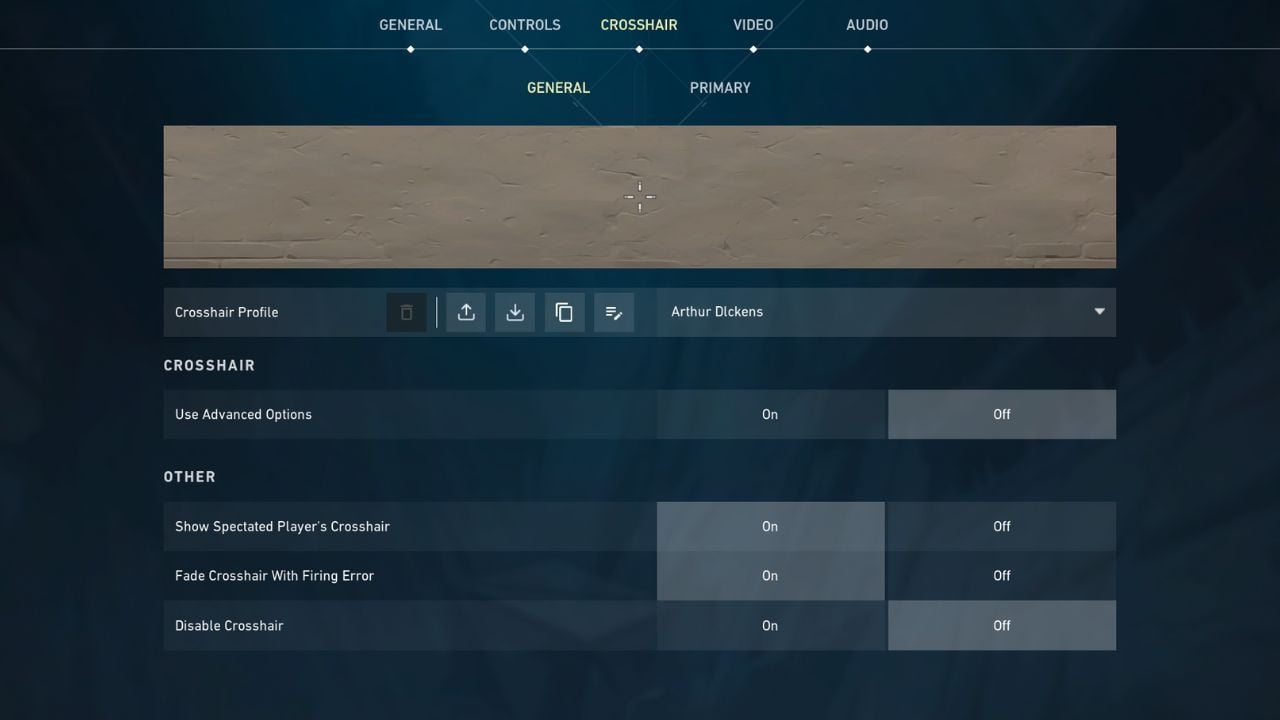
- Before you go crosshair hunting, make sure you have an open crosshair profile in your "Crosshair" tab in your settings. Then you can head in-game
- Once in-game, spectate the player whose crosshair you want to try so that their crosshair is displayed on your screen
- Type "/crosshair copy" or "/cc" in your chat box. This imports the crosshair into your Valorant crosshair settings and saves it as a new profile
- After the game, you can go to your settings menu and select the "Crosshair" tab to check out any and all saved crosshairs
- While looking at your crosshair profiles, you can make any desired adjustments including color, size, etc.
- Finally, save this new crosshair as your current crosshair and try it out in a new game
Copying pro Valorant crosshairs
If you're not sure how you feel about your teammates, another great place to get crosshair inspiration is Tracker Network's own Crosshairs Gallery where you can copy crosshair codes from pro players like Sentinels' TenZ.
Related: Sentinels announce the signing of former OpTic Star
To input Crosshair codes instead of copying them in-game, go to your Crosshair tab in your settings and press the download button. An "Import Profile" prompt should appear on your screen.
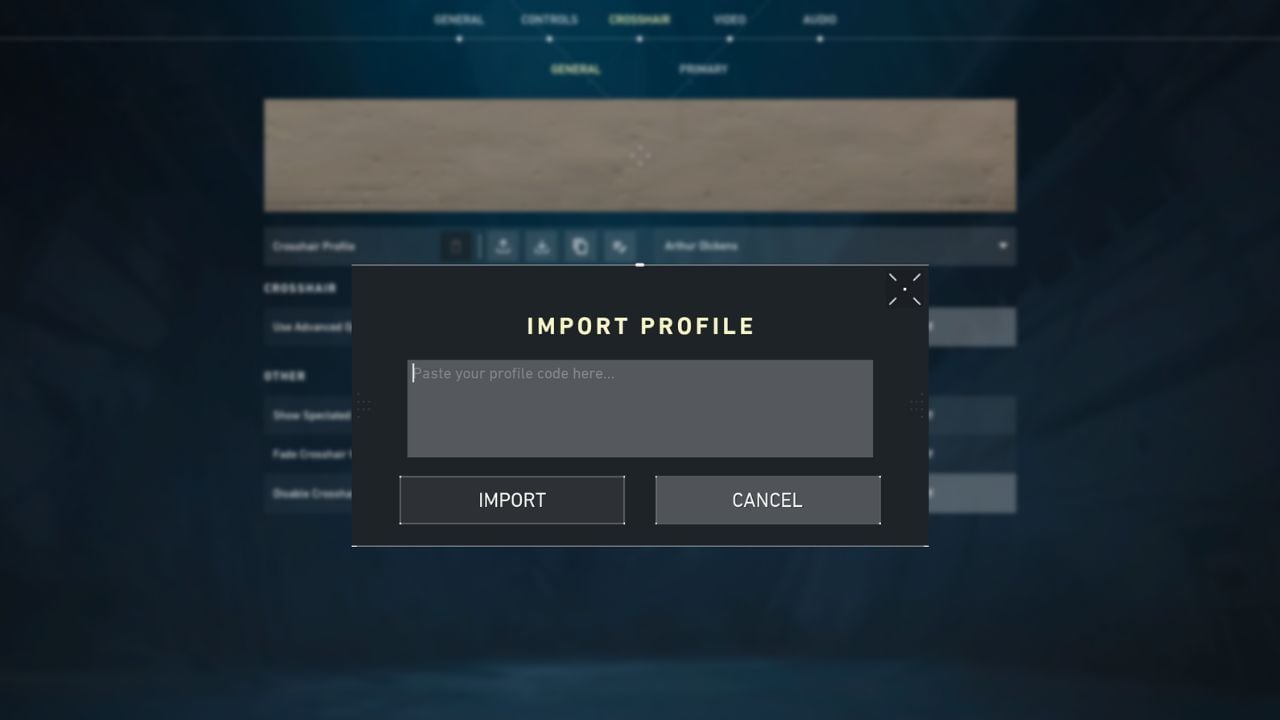
Then, paste the pro crosshair code into the prompt. Once you hit import, you should be able to access the crosshair, edit it any way you need, and try it out in a game. This is also great way to try out your friends' Valorant crosshair codes. You can create and share crosshair codes by hitting the upload button on your crosshair profile.
,fit(cover),quality(80)/https%3A%2F%2Fcms.tracker.gg%2Fcontent%2Fimages%2F2026%2F06%2FMaps.jpg/image.jpg)
,fit(cover),quality(80)/https%3A%2F%2Fcms.tracker.gg%2Fcontent%2Fimages%2F2026%2F06%2FHLban5yWcAAUihk.jpg/image.jpg)
,fit(cover),quality(80)/https%3A%2F%2Fcms.tracker.gg%2Fcontent%2Fimages%2F2026%2F06%2Fdff731d25c880d9910a192a105fcc45e038b8d5b-1920x1080.jpg/image.jpg)
,fit(cover),quality(80)/https%3A%2F%2Fcms.tracker.gg%2Fcontent%2Fimages%2F2026%2F06%2FHLVwwmhWMAAOOcX.jpg/image.jpg)
,fit(cover),quality(80)/https%3A%2F%2Fcms.tracker.gg%2Fcontent%2Fimages%2F2026%2F06%2FHLVupbGXkAAot2_.jpg/image.jpg)