,fit(cover),quality(100)/https%3A%2F%2Ftrackercdn.com%2Fghost%2Fimages%2F2023%2F4%2F26926_Fortnite%25202FA%2520Authentication.jpg/image.jpg)
If you're looking for a way to enable two-factor authentication (2FA) on your Fortnite account, then your search ends here. In the digital world, online security is paramount, especially when it comes to online video games including Fortnite.
That's why we recommend that all Fortnite players and Epic Games account holders enable two-factor authentication (2FA) to protect their personal information, virtual assets, and gaming progress from unauthorised in-game access and theft.
So without further ado, this article provides a detailed breakdown of the steps to enable two-factor authentication (2FA) on your Fortnite account.
What is Two-Factor Authentication (2FA)?
Two-factor authentication, also known as multi-factor authentication (MFA), is a security process that requires users to provide two or more forms of identification to access their accounts or perform certain actions. Typically, these factors fall into three categories:
- Something you know (e.g., a password, a PIN, a secret question)
- Something you have (e.g., a physical token, a mobile device, an email address)
- Something you are (e.g., a biometric identifier, such as a fingerprint or a face scan)
By combining two or more factors, 2FA can significantly reduce the risk of unauthorised access, phishing, hacking, and other security threats. Even if one factor is compromised or stolen, the attacker must provide another factor to gain access.
How to Enable 2FA for Fortnite and Epic Games
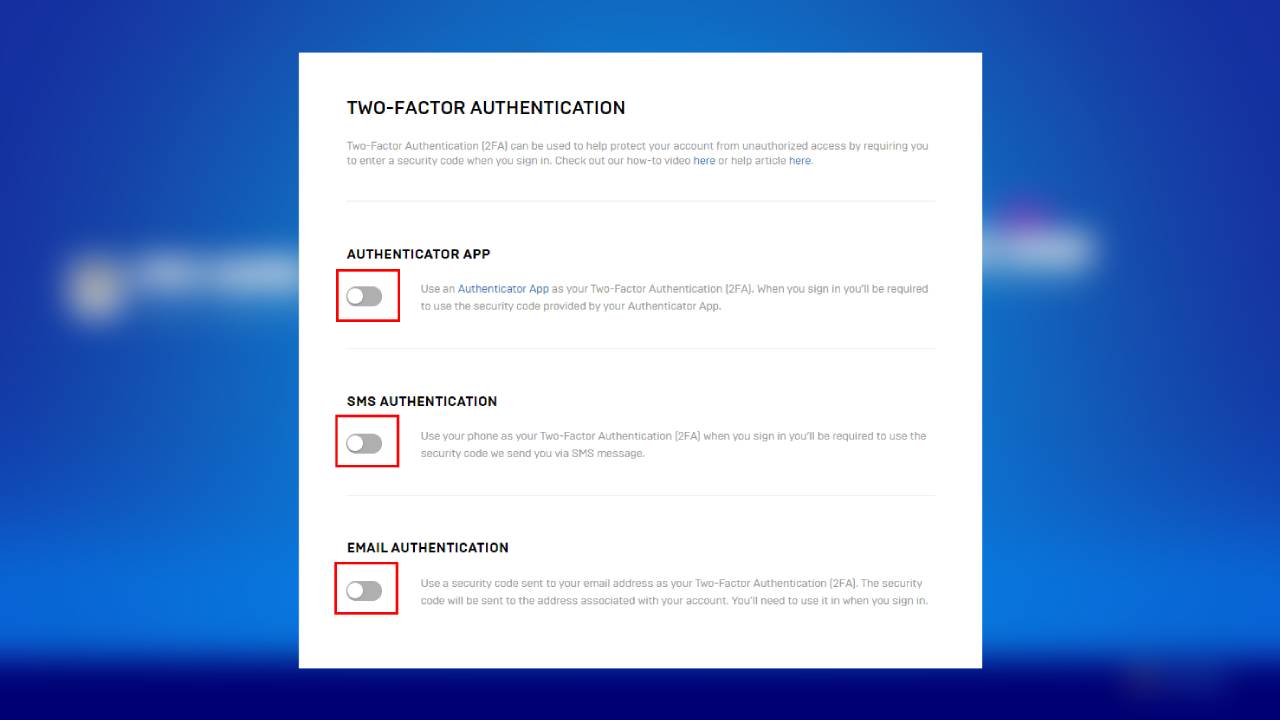
Enabling 2FA for Fortnite and Epic Games is easy and free. Here are the steps:
- Go to the official Epic Games website at www.epicgames.com and log in to your account.
- Click on your account name or avatar at the top right corner of the screen and select "Account."
- Scroll down to the "Password & Security" section and click "Enable Two-Factor Sign In."
- Choose the method of 2FA that you prefer. Epic Games offers several options, including an authenticator app, SMS authentication, Email verification and more.
- Confirm your 2FA settings and save the changes.
Enabling 2FA for your Fortnite and Epic Games accounts can significantly reduce the likelihood of such attacks. By requiring an additional form of identification beyond your password, you can prevent unauthorised logins and transactions, even if your password is compromised or leaked.
Moreover, Epic Games offers various rewards and incentives for enabling 2FA, such as free cosmetics, exclusive items, and even in-game currency.
That's concludes our guide for enabling two-factor authentication (2FA) on your Fortnite account. Before you leave, check out our Fortnite tracker app to monitor your in-game performance.
,fit(cover),quality(80)/https%3A%2F%2Fcms.tracker.gg%2Fcontent%2Fimages%2F2026%2F06%2FHKBQQI6WQAAMa0a.jpg/image.jpg)
,fit(cover),quality(80)/https%3A%2F%2Fcms.tracker.gg%2Fcontent%2Fimages%2F2026%2F06%2Fpremium-frame-spirited_1200x675_comp.png/image.jpg)
,fit(cover),quality(80)/https%3A%2F%2Fcms.tracker.gg%2Fcontent%2Fimages%2F2026%2F05%2FFortnite-Power-Rankings.jpeg/image.jpg)
,fit(cover),quality(80)/https%3A%2F%2Fcms.tracker.gg%2Fcontent%2Fimages%2F2026%2F05%2FHI9JtYgagAAICE1.jpg/image.jpg)
,fit(cover),quality(80)/https%3A%2F%2Fcms.tracker.gg%2Fcontent%2Fimages%2F2026%2F05%2Fa31dc45ada5e1baae65a26fd14d0bf5cdfa363b7-1920x1080.jpg/image.jpg)